3D printing has moved from niche labs into homes, schools, and small businesses across the United States. According to Statista, the global 3D printing market continues to grow rapidly, with billions in projected value over the next few years. Meanwhile, U.S. Department of Energy highlights how additive manufacturing improves efficiency and reduces waste in production.
Choosing the right 3D printer can feel overwhelming at first. However, the right choice depends on your goals, skill level, and how you plan to use it. This guide breaks everything down in simple terms so you can make a smart, confident decision whether you are just starting or already experienced.
Understanding How 3D Printers Work
3D printers create objects layer by layer using digital designs. This process is called additive manufacturing because material builds up instead of being cut away. Most printers use plastic filament, resin, or powder depending on the type.
Although the concept sounds complex, the workflow stays simple. First, you design or download a 3D model. Next, slicing software converts it into instructions. Finally, the printer follows those instructions to build the object step by step.
Because of this layered approach, print quality depends on precision, material, and machine stability. Therefore, understanding the basics helps you choose the right device faster.
Types of 3D Printers You Should Know
FDM Printers
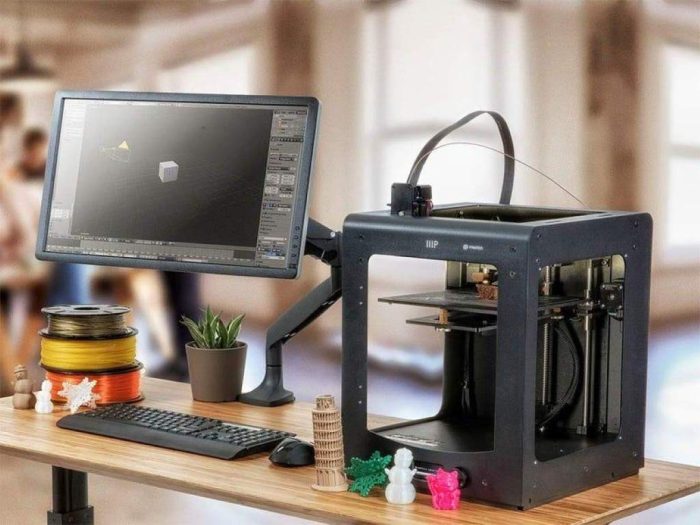
Fused deposition modeling printers are the most common choice for beginners. They melt plastic filament and deposit it layer by layer.
Key benefits include:
- Easy to use and widely available
- Affordable materials
- Strong and durable prints
However, surface finish may appear slightly rough compared to other methods. Still, for most users, FDM offers the best starting point.
SLA Printers
Stereolithography printers use liquid resin and light to cure layers into solid objects.
Advantages include:
- High detail and smooth finishes
- Ideal for small and precise models
On the downside, resin handling requires care and post processing takes more time. Therefore, beginners may need patience when starting with SLA.
SLS Printers
Selective laser sintering uses powder materials and lasers to create objects.
Benefits include:
- No need for support structures
- Strong, complex designs
These machines suit advanced users or businesses. They require more expertise and controlled environments.
Key Factors to Consider Before Buying
Print Quality and Resolution
Resolution determines how smooth and detailed your prints look. Lower layer height usually means better detail. However, it also increases print time.
Beginners should aim for balanced quality instead of chasing the highest resolution. Meanwhile, advanced users may prioritize precision for professional work.
Build Volume
Build volume defines the maximum size of objects you can print. Larger build areas give more flexibility. However, they also require more space and longer print times.
Think about what you plan to create. Small models need less space, while functional parts may require larger dimensions.
Ease of Use
User experience matters a lot, especially for beginners. Look for features like touchscreen controls, auto leveling, and simple setup.
A printer that works smoothly saves time and reduces frustration. Advanced users, however, may prefer more manual control for customization.
Material Compatibility
Different printers support different materials. Common options include PLA, ABS, PETG, and resin.
Each material has unique properties:
- PLA is easy to use and beginner friendly
- ABS offers strength and heat resistance
- PETG balances durability and flexibility
Choosing the right material ensures your prints match your needs.
Speed and Efficiency
Print speed affects productivity. Faster machines complete jobs quickly but may sacrifice detail if not calibrated properly.
Therefore, consider how often you plan to print. Hobby users may not need high speed, while professionals benefit from faster output.
Best 3D Printer Features for Beginners
Plug and Play Setup
Beginners should look for printers that require minimal assembly. A simple setup allows you to start printing quickly without technical hurdles.
Automatic Bed Leveling
This feature ensures the print surface stays even. As a result, prints stick better and failures decrease.
Preloaded Settings
Many beginner friendly printers include ready to use profiles. These settings help new users avoid trial and error.
Strong Community Support
A large user community provides guides, troubleshooting tips, and design files. This support makes learning easier and more enjoyable.
Advanced Features for Experienced Users
Dual Extrusion
Dual extruders allow printing with two materials or colors at once. This feature opens creative and functional possibilities.
Enclosed Build Chamber
An enclosed design maintains stable temperature. Therefore, it improves print quality for advanced materials like ABS.
Custom Firmware and Software
Advanced users often tweak settings and firmware. This flexibility helps optimize performance for specific projects.
High Precision Components
Better motors and rails increase accuracy. As a result, prints become more consistent and professional.
Software and Compatibility
Software plays a major role in 3D printing success. Most printers work with slicing programs that convert models into instructions.
Popular slicing tools offer features like:
- Adjustable layer height
- Speed control
- Support structure generation
Compatibility with common file formats ensures you can use models from various sources. Therefore, always check software support before buying.
Safety Considerations
Safety should never be overlooked. While 3D printers are generally safe, certain precautions matter.
Important safety tips include:
- Keep the printer in a ventilated area
- Avoid touching hot components
- Use proper handling for resin materials
Following these steps ensures a safe and smooth printing experience.
Real World Use Cases
Hobby and DIY Projects
Many users start with simple items like phone stands or decorative models. These projects build skills and confidence over time.
Education and Learning
Schools across the USA use 3D printers to teach design and engineering concepts. Students gain hands on experience that improves problem solving skills.
Small Business and Prototyping
Entrepreneurs use 3D printing to create prototypes and custom products. This approach reduces development time and allows quick iteration.
Common Mistakes to Avoid
Choosing Based on Price Alone
A cheaper printer may lack important features. Therefore, always balance cost with functionality.
Ignoring Maintenance Needs
Regular cleaning and calibration keep your printer running smoothly. Neglecting maintenance leads to poor results.
Skipping Learning Basics
Understanding settings and materials improves print quality. Beginners who rush often face repeated failures.
Overlooking Upgrade Potential
Some printers allow upgrades over time. This flexibility helps you grow without replacing the entire machine.
Step by Step Buying Checklist
- Define your purpose clearly
- Choose the right printer type
- Check build volume and resolution
- Evaluate ease of use features
- Confirm material compatibility
- Review software support
- Consider long term scalability
Following this checklist simplifies the decision process and ensures you choose wisely.
Conclusion
Choosing the right 3D printer depends on your goals, experience, and expected usage. Beginners should focus on ease of use and reliability, while advanced users can explore precision and customization features. Understanding printer types, materials, and key specifications helps you avoid common mistakes.
Take time to evaluate your needs before making a decision. Start with a printer that matches your current level, then grow your skills over time. The right choice will not only save effort but also unlock endless creative possibilities.
FAQs
What is the best 3D printer type for beginners
FDM printers are usually the best choice for beginners. They are easy to use, widely available, and support affordable materials like PLA.
How much space do I need for a 3D printer
Most desktop printers fit on a table. However, you should also allow extra space for ventilation and movement.
Can I use any material in a 3D printer
No, each printer supports specific materials. Always check compatibility before using a new filament or resin.
How long does it take to print an object
Print time depends on size, detail, and speed settings. Small objects may take a few hours, while larger prints can take a full day or more.
Do I need design skills to use a 3D printer
Not necessarily. You can download ready made models online. However, learning basic design skills gives you more flexibility.