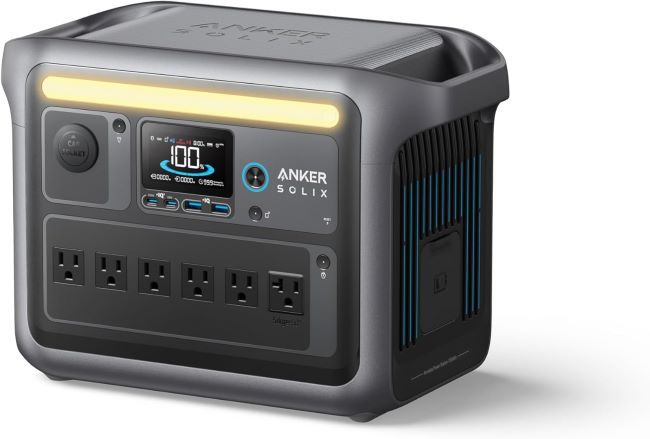
Charge the Anker SOLIX C1000 Power Station by connecting it to a standard wall outlet, compatible solar panels, or a vehicle charging port. Always use the recommended charging accessories and monitor the battery status through the display or the companion app for safe, efficient charging.
Portable power stations have become essential for home backup, outdoor adventures, and remote work. Industry reports estimate that the global portable power station market continues growing at a strong annual rate because users want dependable backup electricity. Many owners also rely on the Anker SOLIX C1000 portable power station for its fast charging capabilities and reliable battery technology. This guide explains every practical charging method while helping you maximize battery performance and long term reliability.
Why Proper Charging Matters
Correct charging protects the battery while maintaining consistent performance throughout its lifespan. Good charging habits also reduce unnecessary battery stress during daily use.
Following recommended charging procedures helps preserve battery capacity for many years. Furthermore, proper charging reduces heat generation and improves overall charging efficiency.
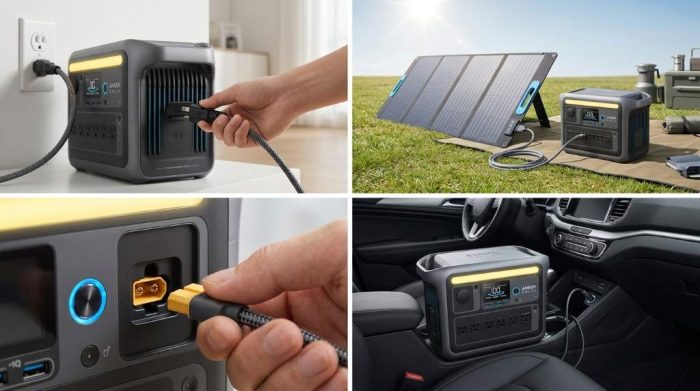
Charging Methods for Anker SOLIX C1000 Power Station
The Anker SOLIX C1000 supports multiple charging methods for different situations. Each option provides flexibility depending on your location and available power source.
Charge Using an AC Wall Outlet
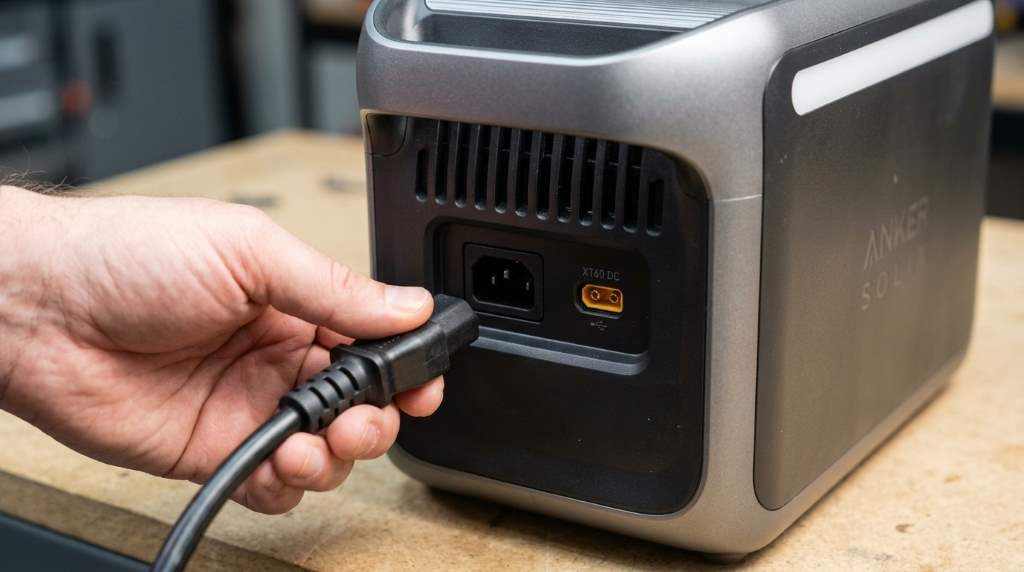
Wall charging remains the fastest and most convenient method for most users. Simply connect the supplied AC charging cable to the power station and a grounded electrical outlet.
The built in display immediately shows charging status, battery percentage, and estimated remaining charging time. Therefore, you can easily monitor progress without additional equipment.
- Place the unit on a flat surface.
- Ensure the ventilation openings remain unobstructed.
- Connect the original AC charging cable securely.
- Plug the cable into a reliable wall outlet.
- Verify charging information on the display.
Charge with Solar Panels
Solar charging offers an excellent solution during camping trips and emergency situations. Compatible solar panels connect directly through the supported solar input connection.
Solar charging speed depends on sunlight intensity, panel wattage, and weather conditions. Position the panels toward direct sunlight for the highest charging efficiency.
- Use compatible solar panels within supported voltage limits.
- Avoid shading across any panel surface.
- Clean the panels before charging begins.
- Adjust panel direction throughout the day.
- Disconnect during severe storms.
Charge from a Vehicle
Vehicle charging provides additional flexibility during long road trips or camping adventures. Connect the vehicle charging cable after starting the engine.
Running the engine prevents excessive battery drain from the vehicle battery. Consequently, both systems remain protected during extended charging sessions.
How Long Does Charging Take?
Charging time varies according to the selected power source and environmental conditions. AC charging usually delivers the quickest results under normal operating temperatures.
Solar charging requires more time because available sunlight changes throughout the day. Vehicle charging generally remains slower than dedicated AC charging.
| Charging Method | Typical Speed | Best Use |
|---|---|---|
| AC Wall Outlet | Fastest | Home charging |
| Solar Panels | Moderate | Camping and emergencies |
| Vehicle Charging | Slower | Travel and road trips |
Tips for Faster Charging
Several simple practices improve charging efficiency without affecting battery safety. These habits also help maintain stable battery performance over time.
- Keep the unit in a cool environment.
- Use the original charging accessories.
- Avoid charging under direct sunlight.
- Disconnect unnecessary output devices.
- Keep charging ports clean.
Battery Care Best Practices
Proper battery maintenance extends overall battery health and improves long term reliability. Small habits often create noticeable improvements after years of ownership.
Recharge the battery before completely draining it whenever possible. Additionally, store the power station with a partial charge during long storage periods.
Avoid Extreme Temperatures
High temperatures increase battery wear and reduce charging efficiency over time. Extremely cold environments also slow charging performance considerably.
Store the power station indoors whenever practical between regular uses. Moderate temperatures provide the best conditions for battery longevity.
Inspect Charging Accessories
Check charging cables before every charging session for visible damage or excessive wear. Replace damaged accessories immediately to maintain safe operation.
Loose connectors may interrupt charging and reduce overall efficiency. Therefore, always ensure every connection remains secure before charging starts.
Common Charging Problems and Solutions
The Battery Is Not Charging
Confirm every cable connection before assuming the unit has developed a fault. Next, verify the electrical outlet or charging source works correctly.
Inspect charging ports for dust, debris, or physical damage before reconnecting everything. Most charging interruptions result from connection problems instead of hardware failure.
Charging Seems Too Slow
High temperatures often reduce charging speed to protect internal battery components. Move the unit into a cooler location before continuing the charging process.
Solar charging also slows during cloudy weather or poor panel positioning. Better sunlight exposure usually restores expected charging performance.
The Display Shows Unexpected Messages
Read the displayed notification carefully before disconnecting any charging accessories. Most alerts provide useful guidance for correcting simple operating issues.
Restart the charging session after correcting the reported condition. Contact customer support if identical messages continue appearing repeatedly.
Safety Tips During Charging
Always place the power station on a stable, dry surface before charging begins. Good airflow prevents excessive heat buildup around internal components.
Never cover the ventilation openings while charging remains active. Likewise, avoid exposing the unit to water or excessive moisture.
- Keep children away during charging.
- Use approved charging accessories only.
- Disconnect damaged cables immediately.
- Avoid enclosed spaces with poor ventilation.
- Inspect the unit regularly.
When Should You Recharge the Power Station?
Recharge the battery after heavy use instead of waiting until complete discharge. Frequent partial charging supports healthier battery performance over time.
Long term storage also requires occasional charging to maintain battery condition. Check the battery level every few months during storage.
Conclusion
Charging the Anker SOLIX C1000 Power Station correctly keeps the battery healthy while delivering dependable performance whenever power is needed. Following recommended charging methods, routine maintenance, and basic safety practices helps maximize battery life and charging efficiency.
Use these charging tips consistently to protect your investment and enjoy reliable portable power for many years. Review your charging routine today and apply these best practices before your next trip or emergency.
Frequently Asked Questions
Can I use solar panels to charge the Anker SOLIX C1000?
Yes, compatible solar panels within the supported input specifications can safely charge the power station.
Can I leave the power station plugged in overnight?
Yes, the built in battery management system helps protect the battery during normal charging.
Does charging while using the power station cause problems?
No, the unit supports charging while powering compatible connected devices.
Should I completely drain the battery before recharging?
No, partial charging generally supports better long term battery health.
Why is my solar charging slower than expected?
Cloud cover, poor panel positioning, or reduced sunlight commonly decrease solar charging speed.