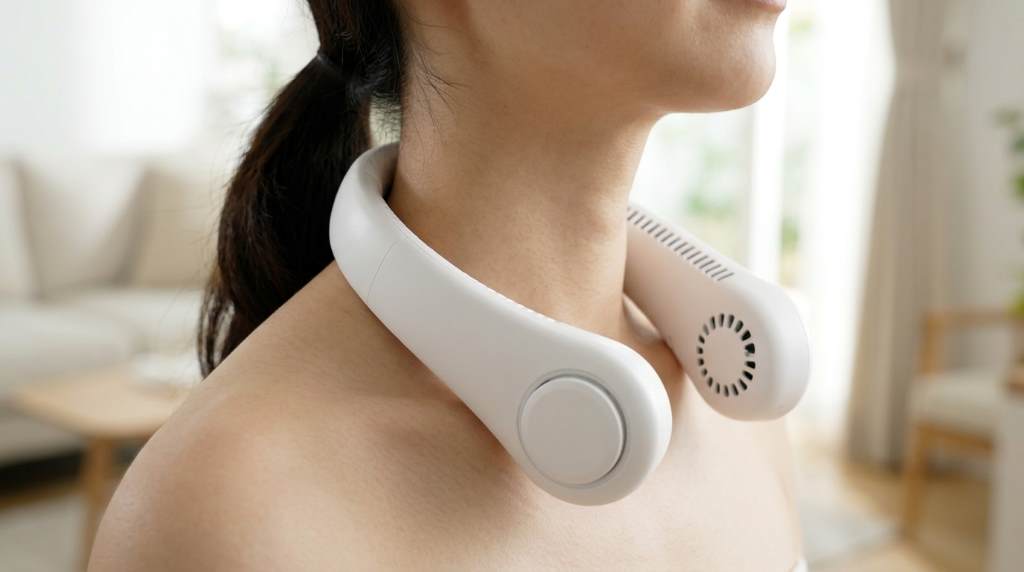
Wear a portable neck fan by placing it comfortably around your neck with the air outlets facing upward toward your face. Charge it with the included USB cable until the battery indicator shows full power before using it for the best cooling performance.
Staying cool during outdoor activities, travel, or daily work has become much easier with wearable cooling devices. According to industry reports, the global portable fan market continues growing as more people seek convenient personal cooling solutions. Likewise, rechargeable wearable fans have gained popularity because they offer hands free comfort without bulky equipment. This guide explains everything about wearing and charging your portable fan correctly. You can also explore different portable neck fan models before choosing the right option for your needs.
Why Proper Use Matters
Correct usage improves cooling performance and extends battery life. It also keeps the fan comfortable throughout long periods of use.
Many people simply place the fan around their neck without making adjustments. However, proper positioning creates stronger airflow and reduces unnecessary battery consumption.
How to Wear a Portable Neck Fan Correctly
Position the Fan Properly
Place the fan evenly around your neck before turning it on. Keep both air outlets pointing upward toward your cheeks and chin.
Adjust the flexible arms until the airflow reaches your face comfortably. This position delivers balanced cooling without creating neck strain.
Find a Comfortable Fit
Choose a position that feels secure without squeezing your neck. Most wearable fans include flexible materials that allow gentle adjustments.
A comfortable fit helps prevent movement while walking or working. Therefore, you can enjoy consistent airflow during daily activities.
Avoid Blocking the Air Intake
Hair, scarves, and thick clothing can block the air intake vents. Consequently, the fan works harder while producing weaker airflow.
Tie long hair when necessary before using the device outdoors. This simple habit improves cooling efficiency and protects the fan motor.
Best Situations for Wearing a Portable Neck Fan
- Walking outdoors
- Gardening
- Traveling
- Camping
- Sporting events
- Commuting
- Office work
- Cooking
- Light exercise
- Shopping
Portable neck fans provide steady airflow without occupying your hands. As a result, they remain practical during many everyday tasks.
How to Charge a Portable Neck Fan
Step 1: Turn Off the Fan
Always switch the fan off before connecting the charging cable. This habit protects the battery and improves charging efficiency.
Step 2: Connect the USB Cable
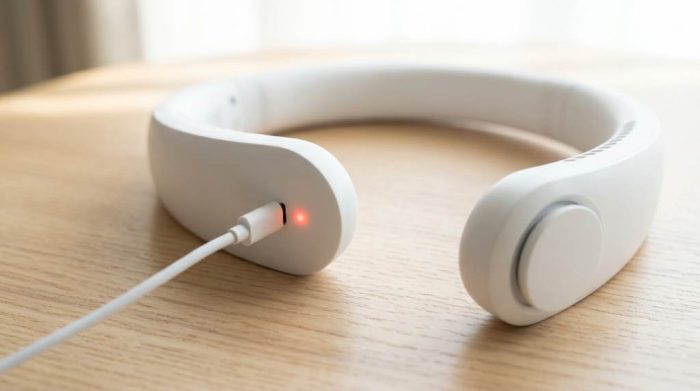
Insert the charging cable firmly into the charging port. Next, connect the opposite end to a reliable USB power source.
Most modern neck fans use USB C or Micro USB connections. Always use the cable recommended by the manufacturer whenever possible.
Step 3: Monitor the Charging Indicator
Most portable neck fans include an LED charging indicator. Usually, the light changes color or switches off after full charging.
Read the user manual if the indicator behaves differently. Every manufacturer may use different charging signals.
Step 4: Disconnect After Full Charging
Remove the charging cable once the battery reaches full capacity. This practice helps reduce unnecessary battery wear over time.
Although many devices include charging protection, unplugging remains a smart habit. Therefore, your battery may maintain better long term performance.
How Long Does Charging Usually Take?
Most portable neck fans require between two and four hours for a complete charge. Battery size and charger output affect the total charging time.
Higher capacity batteries generally provide longer operating hours. However, they may also require additional charging time.
Tips for Better Battery Life
- Charge before the battery becomes completely empty.
- Use the original charging cable whenever possible.
- Store the fan in a cool dry place.
- Avoid exposing the battery to direct sunlight.
- Recharge the fan regularly during long storage periods.
These simple habits help preserve battery health over many charging cycles. Consequently, the fan continues delivering reliable performance.
Common Charging Problems and Solutions
The Fan Does Not Charge
Inspect the charging cable for visible damage before trying another cable. Also, test a different USB adapter or power outlet.
Clean the charging port carefully with dry compressed air if necessary. Dust buildup sometimes interrupts proper electrical contact.
The Battery Drains Quickly
High speed settings naturally consume more battery power than lower settings. Therefore, switch to medium speed whenever full airflow remains unnecessary.
Older batteries gradually lose capacity after many charging cycles. In that situation, replacing the device may become the better solution.
The Fan Gets Warm While Charging
Mild warmth during charging remains completely normal for rechargeable electronics. However, disconnect the charger if excessive heat develops.
Allow the device to cool before charging again if overheating occurs. Contact customer support if the problem continues.
Cleaning Before Charging
Remove dust from the air vents with a soft brush every few weeks. Clean vents improve airflow and reduce motor stress.
Wipe the exterior gently using a dry microfiber cloth. Never immerse the fan in water unless the manufacturer specifically allows it.
Safety Tips for Daily Use
- Keep the fan away from water.
- Avoid dropping the device.
- Do not insert objects into the air vents.
- Store away from extreme temperatures.
- Keep children supervised during use.
Following these precautions improves both safety and product lifespan. Additionally, regular care helps maintain consistent cooling performance.
Choosing the Right Fan Speed
Low speed works well indoors and extends battery life significantly. Medium speed balances comfort and operating time for daily use.
Reserve high speed for intense outdoor heat or physical activity. Consequently, you will maximize battery efficiency throughout the day.
Conclusion
Learning how to wear and charge a portable neck fan correctly improves comfort, battery life, and overall performance. Small adjustments and proper charging habits make a noticeable difference during everyday use.
Apply these tips whenever you use your wearable fan for the best experience. Start following these simple practices today to enjoy longer lasting cooling wherever you go.
Frequently Asked Questions
Can I wear a portable neck fan while walking?
Yes, portable neck fans are designed for comfortable hands free use while walking.
Can I use my neck fan while charging?
No, charging while operating is generally not recommended unless the manufacturer specifically allows it.
How often should I charge a portable neck fan?
Recharge the fan whenever the battery becomes low after regular use.
Can I charge a portable neck fan with a power bank?
Yes, most USB rechargeable neck fans work safely with compatible power banks.
How can I make the battery last longer?
Use lower speed settings, avoid overcharging, and store the fan in a cool location.